How Petra Calculates Billable Licenses
Petra calculates billable identities as the identities which have at least one Microsoft license assigned to them. We only count actual users who are assigned licenses, excluding certain special case non-human licenses and free/trial licenses.Excluded Licenses
The following Microsoft licenses are excluded from billing calculations:- Microsoft 365 Audio Conferencing
- Teams Exploratory
- Microsoft Fabric (Free)
- Business Apps (Free)
- Microsoft Teams (Free)
- Microsoft Power Automate Free
- Microsoft Teams Phone Resource Account
- Microsoft Teams Shared Devices
- Microsoft Teams Phone Standard
- Microsoft Teams Audio Conferencing with dial-out to USA/CAN
- Microsoft Teams Domestic Calling Plan Zone 1
- Microsoft Power Apps Plan 2 Trial
- Power Automate Premium
- Skype for Business PSTN Domestic Calling
Viewing Billable Users for a Tenant
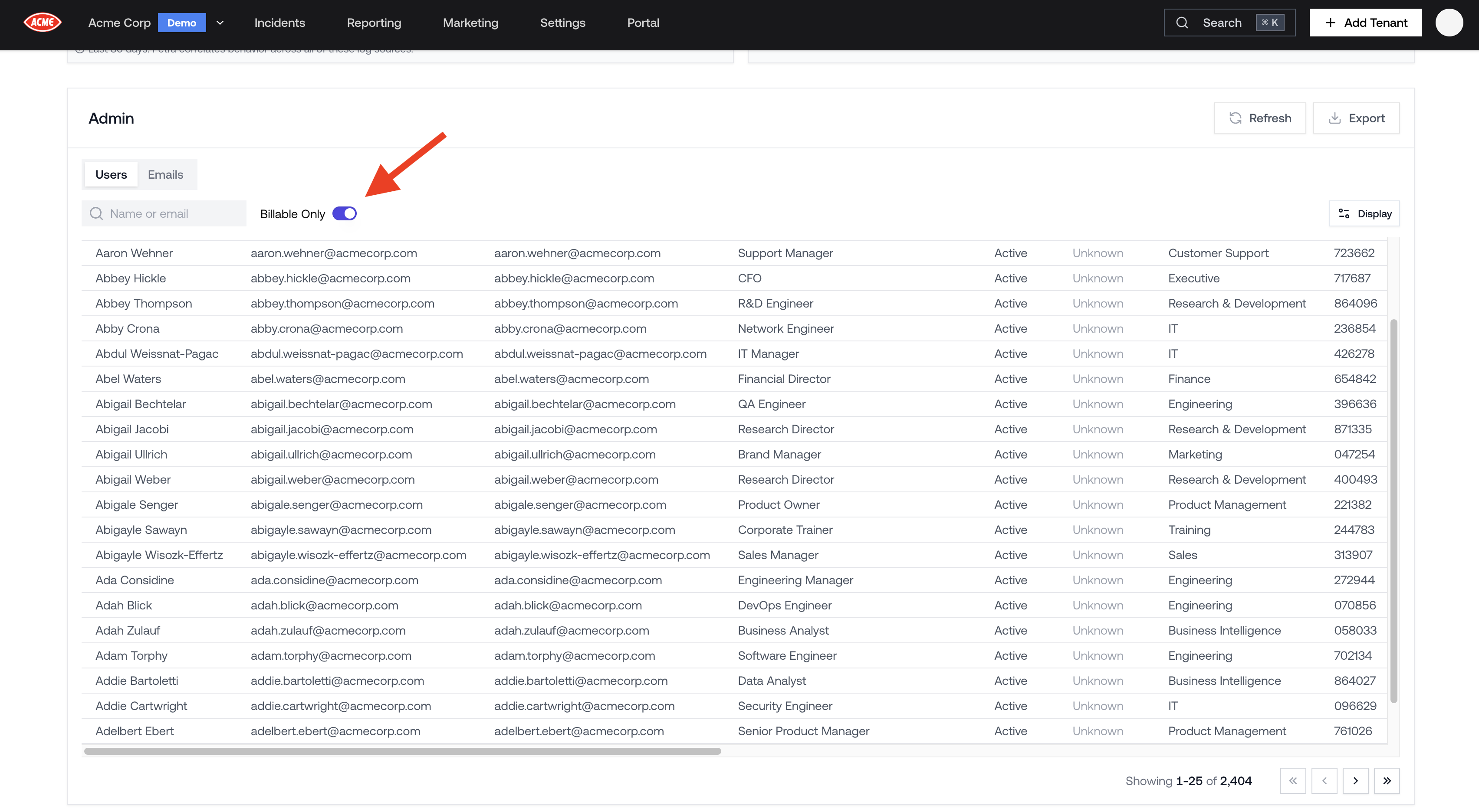
You can see exactly which users are billable for any tenant directly in the Petra dashboard.- From the Homepage, click on a tenant to open the tenant page.
- Scroll down to the Admin panel.
- Select the Users tab.
- Toggle Billable Only on to filter the table to only billable users.